

Can someone please explain to me how the Vixen channel patching and preview layout are used or not used in the FPP channel output setup. I have a preview that looks great in Vixen V3 with Boscoyo snowflakes using the Wipe effect with the direction set to circle burst. In real life they don't look anything like they do in the preview screen. I have the snowflake setup with the middle circle and each branch in a prop that I created from a downloaded picture of the snowflake. The pixels are laid out just like they were installed in the snowflake.

davdue wrote:Can someone please explain to me how the Vixen channel patching and preview layout are used or not used in the FPP channel output setup. I have a preview that looks great in Vixen V3 with Boscoyo snowflakes using the Wipe effect with the direction set to circle burst. In real life they don't look anything like they do in the preview screen. I have the snowflake setup with the middle circle and each branch in a prop that I created from a downloaded picture of the snowflake. The pixels are laid out just like they were installed in the snowflake.
Do you have channel outputs setup correctly in FPP? Vixen exports a co-universe.json file you can upload to FPP. Btw. One way to find out if your Vixen is setup right is ro run the lights from Vixen instead of FPP. If they run correctly from Vixen then something isn't set right in FPP. Also, warning, do not have Vixen running the same time FPP is running. When you launch Vixen it automatically starts outputting and if both Are running your lights won't act correctly. Make sure Vixen outputs are turned off for each controller.
Sent from my SM-T710 using Tapatalk
I have never used the co-universe file. This is for a small display at a realtors office. I have PixaBulbs outlining the 3 windows, 3 snowflakes in each window above the window outlines, and 2 candy canes in the two outside windows. It is all ran by a Pi Zero W with a pixel string PiHat. So I just have pihat output 1 starting at output 1 for 418 pixels with the end output being 1254.
Sent from my iPhone using Tapatalk
davdue wrote:I have never used the co-universe file. This is for a small display at a realtors office. I have PixaBulbs outlining the 3 windows, 3 snowflakes in each window above the window outlines, and 2 candy canes in the two outside windows. It is all ran by a Pi Zero W with a pixel string PiHat. So I just have pihat output 1 starting at output 1 for 418 pixels with the end output being 1254.Sent from my iPhone using Tapatalk
You don't need the co-universe file. You can enter the values manually. My point was are the values correct?
Sent from my SM-T710 using Tapatalk
I think so. I just have never understood how the setup in Vixen relates to what is setup in FPP. Especially when it comes to the element’s physical position related effects like wipe.
Sent from my iPhone using Tapatalk
davdue wrote:I think so. I just have never understood how the setup in Vixen relates to what is setup in FPP. Especially when it comes to the element’s physical position related effects like wipe.Sent from my iPhone using Tapatalk
If doing a wipe then you need to set it to location and not strings. That location is determined in your preview setup. Setting FPP outputs is much like the controller setting for a 682 web page. If you have only one controller then FPP output setup must match the controller setup. However, if you're using more than one controller then the setup in FPP channel output will be different because FPP is using sequential channels. It will not match your 2nd controller. That's because each controller always starts on channel 1 but the universes are unique to each controller. Let's say controller 1 uses 4 universes with 4,000 channels. Controller 2 uses 2 universes with 1,000 channels. FPP will show 4 universes starting channel 1 and ending channel 4,000. Then the next output on FPP will show universe 5 starting on channel 4,001. The channel output keeps growing depending on how many controllers and channels are used. You can actually generate the co-universe.json file and open it in a text editor and use those values to enter into FPP.
Sent from my SM-T710 using Tapatalk
Here is an example of what FPP output would look like using 6 controllers.

Sure I understand how the outputs work. I’m just trying to figure out why the wipe circle burst isn’t working right on the snowflakes. At times only one branch of the snowflake lights up and other times The whole snowflake lights up and just the colors change per the gradient I have set. I believe they are all the same setup on the wipe. I need to watch and keep track of the run time in the status page so I can see when it is in the Vixen sequence.
Are you talking about the Vixen effect setup when you said set it to location and not strings? It looks fine in the Vixen preview just not in real life. I’m not sure what you mean by 682 web page. I have only used ESPixelPop’s and Renards for my light control.
Sent from my iPhone using Tapatalk
davdue wrote:Sure I understand how the outputs work. I’m just trying to figure out why the wipe circle burst isn’t working right on the snowflakes. At times only one branch of the snowflake lights up and other times The whole snowflake lights up and just the colors change per the gradient I have set. I believe they are all the same setup on the wipe. I need to watch and keep track of the run time in the status page so I can see when it is in the Vixen sequence.Are you talking about the Vixen effect setup when you said set it to location and not strings? It looks fine in the Vixen preview just not in real life. I’m not sure what you mean by 682 web page. I have only used ESPixelPop’s and Renards for my light control.
Sent from my iPhone using Tapatalk
I must have misunderstood. I thought you were using a 682.
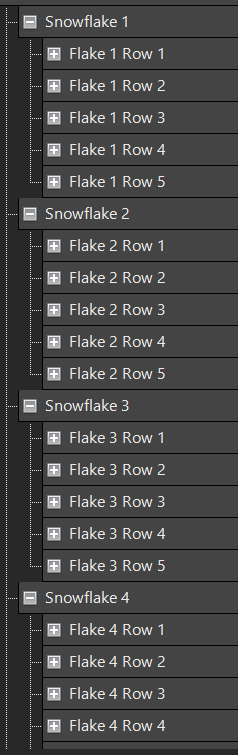
Did you patch the snowflake from the center out? I have those snowflakes, rather I did until I sold them, and are the center, middle and outside set in groups?
Sent from my SM-T710 using Tapatalk