

Sorry if this is in the wrong spot but I used the 1.4 firmware on arduino because I can't get the flash tool to work. I had 1 pixel stick from Renard and got it on 2.0 but I can't remember how I updated from 1.4 to 2.0. It was long ago. I'm trying to flash my EPS v2 that I got from the group buy just a month ago.
Thanks,
Curtis

For those of you experiencing issues with the flash tool giving you garbage in the monitor window, how many serial ports is your system reporting?
thanks,
-shelby

Seems like I've followed the directions, and I've flashed other Pixelsticks but now I don't even get to the flash tool screen. I've downloaded the latest from the GitHub link, unzipped to it's own directory and then get the following message when running the ESPSFlashTool.jar file.
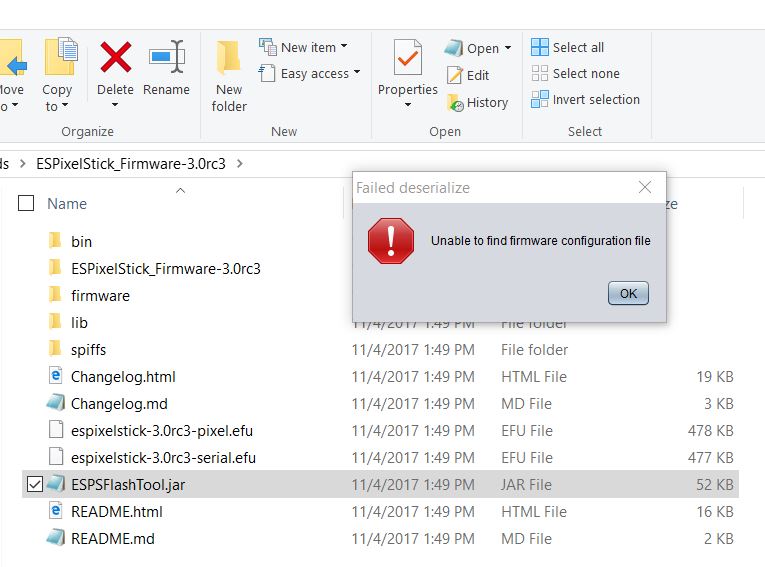
blantrip wrote:Seems like I've followed the directions, and I've flashed other Pixelsticks but now I don't even get to the flash tool screen. I've downloaded the latest from the GitHub link, unzipped to it's own directory and then get the following message when running the ESPSFlashTool.jar file.
Did you extract another copy into that same directory as well? Is there a "firmware.json" file in the firmware directory?
sporadic wrote:Did you extract another copy into that same directory as well? Is there a "firmware.json" file in the firmware directory?
I don't believe I extracted another copy into the directory. There is a "firmware.json" file, see pic below. I've also tried downloading previous versions as well and get similar messages for each. I've re-booted my computer a few times as well. Also tried it extracted to my d: drive with the same results. This is a new laptop, so I'll try my other laptop as well.
