

VAMP UTILITIES
1) Close AUDACITY (if open)
To install the VAMP utilities into audacity.
1) Download and unzip the attached ZIP file.
There are three (3) files that we need to concern ourselves with.
qm-vamp-plugins.cat
qm-vamp-plugins.dll
qm-vamp-plugins.n3
2) copy these three files to your AUDACITY folder

specifically the PLUG-INS folder
3) launch AUDACITY
when you click ANALYZE there will be a whole list of new options

Sean recommends playing with them all to see what you like..
There are 3 that he uses.
They are:
Poly Beat Tracker: Beat Count
Note Onset Detector: Note Onsets…
Polyphonic Transcription
The first one simply detects the beat count whether it is four four (4/4) time or whatever. Then displays the beat of the music, even if it changes.
The second one will give you timing marks VERY quickly. I use this and then remove the one's I do not want.
The last one is the one he uses for the piano keyboard (piano in xlights)
Select the one you want (or all) and save each one.
It is a good idea to associate each of the mark files with the song identified by a marker such as
Wizards beat, Wizards note, or Wizards Poly. When audacity exports the file it will be saved with a txt extension.
NOTE: when saving files from the VAMP add on (plug in) – you will need to change the name before saving.

thanks! clear and succint
Sean
Littleton, CO
Latest releases http://nutcracker123.com/nutcracker/releases
xLights/Nutcracker Forum http://nutcracker123.com/forum/index.php
Facebook https://www.facebook.com/groups/628061113896314


Thanks. I've been looking for software like this for a long time.
Thanks again;
Johh

I have downloaded the vamp plugins 3 times now and still cant get it to work with my audacity. Will this work with version 2.0.3 (current release)?

RichF wrote:I have downloaded the vamp plugins 3 times now and still cant get it to work with my audacity. Will this work with version 2.0.3 (current release)?
Same with me too.
When I follow the install instructions, and launch Audacity, I click on the "Analyze" and the plug-in does not show up in the list.
Same here, no added analyzers ..

I keep trying to unzip this and it tells me it is not a zip file or it is corrupt. I have tries on two different computers. Anybody else had this issue?
atxc5 wrote:I keep trying to unzip this and it tells me it is not a zip file or it is corrupt. I have tries on two different computers. Anybody else had this issue?
Yes this is happening to me too
For myself, I tried putting teh 3 plugins into C:\Program Files (x86)\Audacity\Plug-Ins
launched audacity, no plugins.
i then created a directory under program files (x86) and put the 3 files there
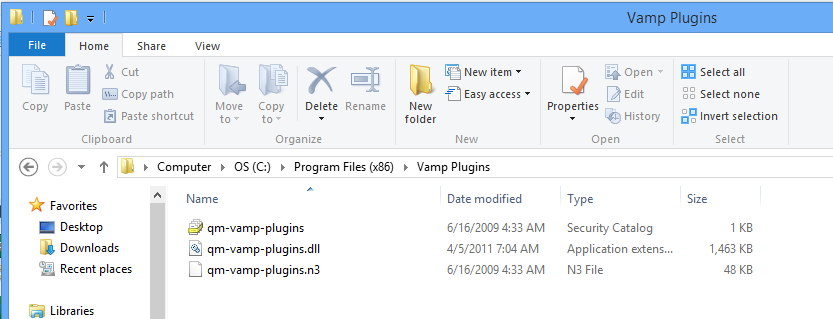
It still didnt work until i modified the system path.
There is a program in your xlights directory that i use to modify the windows path. The program is called PathEditor.exe. To run it, right click and run it as administrator.
I added the path C:\Program Files (x86)\Vamp Plugins
After doing this , when i launched audacity i now saw the plugins present.
i am not sure which one of these steps made it work, but they are in the menu now.
sean
Sean
Littleton, CO
Latest releases http://nutcracker123.com/nutcracker/releases
xLights/Nutcracker Forum http://nutcracker123.com/forum/index.php
Facebook https://www.facebook.com/groups/628061113896314
Sorry, I don't understand what the C:\Program Files (x86) \Vamp Plugins is, but tried everything else and no plugins.
John